Our Story

Who we are and how we solve complex IT challenges.

Our Certifications

Microsoft certifications and partnerships validating our technical expertise.

Leadership

Meet the Experienced Leadership Team Driving WME’s Success

Advisory Updates

Expert guidance on Microsoft, security, and compliance developments.

Case Studies

Real-world outcomes from complex Microsoft-focused IT engagements.

Financial Industry

Secure technology solutions for regulated banks and financial institutions.

Healthcare

Secure Microsoft solutions for compliant, connected, and modern healthcare organizations.

Manufacturing

Cloud and security solutions supporting modern manufacturing operations.

Non-Profit

Cost-efficient Microsoft solutions for mission-driven organizations.

Public Sector

Microsoft-based IT services for secure public sector modernization.

High Tech

Scalable cloud, security, and staffing for fast-growing technology companies.

SMBs

Scalable cloud, security, and staffing for fast-growing technology companies.

Cloud Migration Services

Transition your workloads to the cloud securely for greater scalability and performance.

Data Migration Services

Securely transfer your business data with minimal downtime and maximum integrity.

Application Migration Services

Move your applications seamlessly to modern platforms with minimal business disruption.

Identity & Security Migration Services

Strengthen identity management and security while transitioning to modern Microsoft solutions.

IT Staffing

Connect with skilled IT professionals to strengthen your team and accelerate project delivery.

Accounting & Finance

Connect with experienced accounting and finance professionals to support your business goals.

Licensing Support

Discover the benefits of both CSP and On-premises licensing options and find the best fit for your unique business needs. From cost savings to flexibility, we’ve got you covered.

Power Platform

Unlock the full potential of the Microsoft Power Platform Suite to streamline operations, automate repetitive tasks, and gain real-time insights that drive business growth.

Sharepoint Solutions

Supercharge your business productivity and enhance visibility through our proven SharePoint expertise.

Security Solutions

Protect your business with proactive cybersecurity, compliance, and risk management solutions.

Endpoint Management

Secure, manage, and monitor every device with modern endpoint management solutions.

Use Azure PIM for Group Membership

June 6, 2023
WME Blogpost Use Azure PIM for Group Membership

A new feature within Azure AD Privileged Identity Management (PIM) allows you to use PIM to control group membership. Like standard PIM- where administrators are given “eligible” assignments to roles rather than active assignments, Azure PIM for groups makes users eligible for group membership, rather than always a member of the group. Users would use PIM to activate their membership in the group.

NOTE: As of this writing, this feature is still in Preview.

Preview features are fully supported by Microsoft but may still have a few bugs or lack a few features that will be taken care of by GA release.

Azure PIM: Use Case #1

A good use case for this new Azure feature is to create bundles of RBAC roles to allow your admins to activate membership of a single group and activate several AAD RBAC roles.

Example #1:

An example of this may be any role plus the Service Support Administrator. This would make it so that your admins do not have to activate multiple roles every day.

Example #2:

Another example may be a bundle of all the Microsoft 365 platform roles like

  • Exchange Administrator,
  • Office Apps Administrator,
  • SharePoint Administrator,
  • Teams Administrator

into one activation.

Azure PIM Use Case #2

Another use case for this is sub-RBAC roles within services that are still assigned directly to users and do not have PIM roles.

Example:

An example of this is the sub-roles in Exchange or Microsoft Purview. Some of these are high impact and should only be active when needed, such as the ability to search and purge email in Exchange.

Azure PIM for Groups: Use Case #3

Finally, PIM for groups can be used to control owners and members. So, another use case for this is have a user always as a member of a group, but if they need to do perform an owner task, they must active the owner role. This allows for a separation of roles.

1.  Global Admins Role

Do not use this feature for the assignment of Global Administrator in Azure AD. The Global Administrator role should only be directly assigned to administrators (NEVER use a group) and should always use standard Azure AD PIM.

2.  Create PIM-Enabled Group

PIM can be enabled on any cloud-based Azure AD security group. It cannot be enabled directly on a synced group, but there is a workaround we’ll talk about later. From the group’s page in AAD, select Privileged Identity Management from the left-pane.
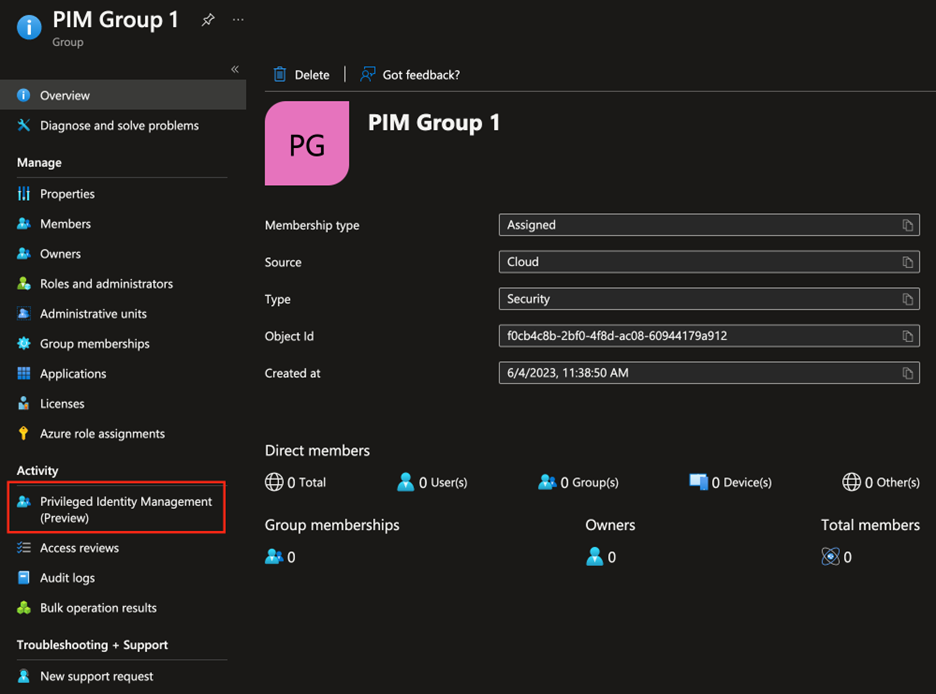
PIM Group 1
  • Click the button Enable Azure AD PIM for this group.
  • From here, this should look like a standard PIM assignment screen. You can add Active or Eligible assignments by clicking Add Assignments. Users or other groups can be added as eligible or active.

Note: Each group has its own set of PIM Settings. Set these on each group by clicking Settings. There are also different settings for Owner and Member.
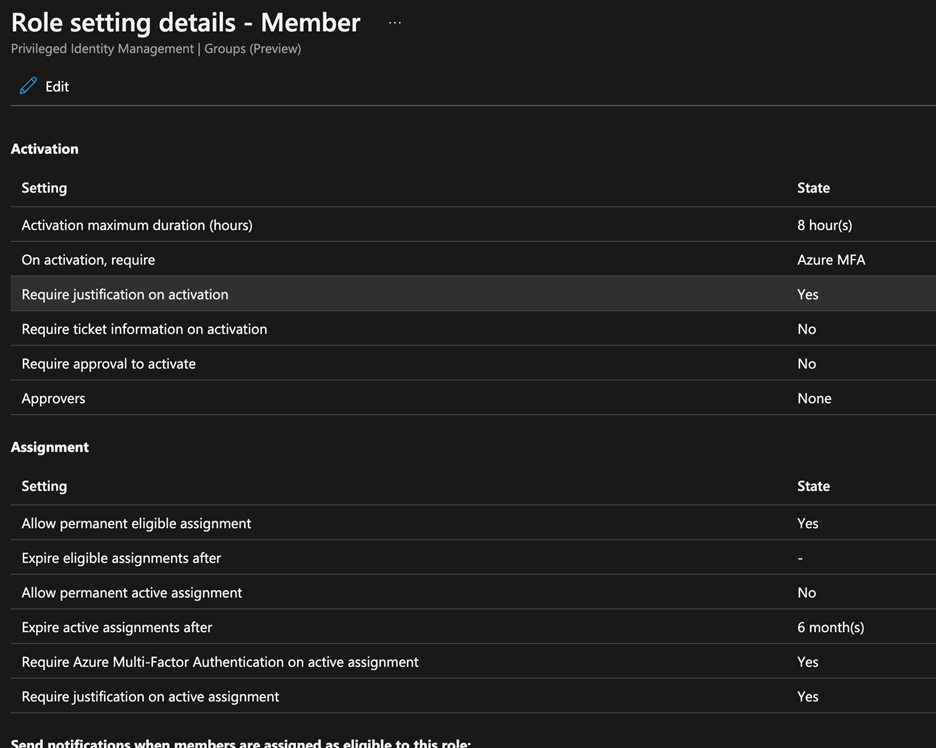
Azure PIM - Role Setting Details - Member

3. Synced Group

Normally, synced groups cannot be used in PIM assignments because synced groups cannot have security roles assigned to them in AAD.

This new feature provides a workaround for this by allowing a synced group to be added as an eligible assignment.

In the previous screenshot, PIM Group 1 is a cloud group. When I click Add Assignments to create a new PIM assignment and click Select Members to add an object to the group, all groups are available.

In my tenant, the group Lic_M365_A5 is a group I sync from on-prem that I use for licensing.
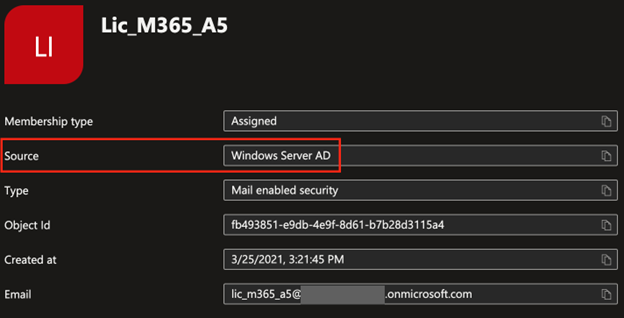
Azure PIM - Lic_M365_A5

When I go to add an eligible assignment to PIM Group 1, this group is an option to add.
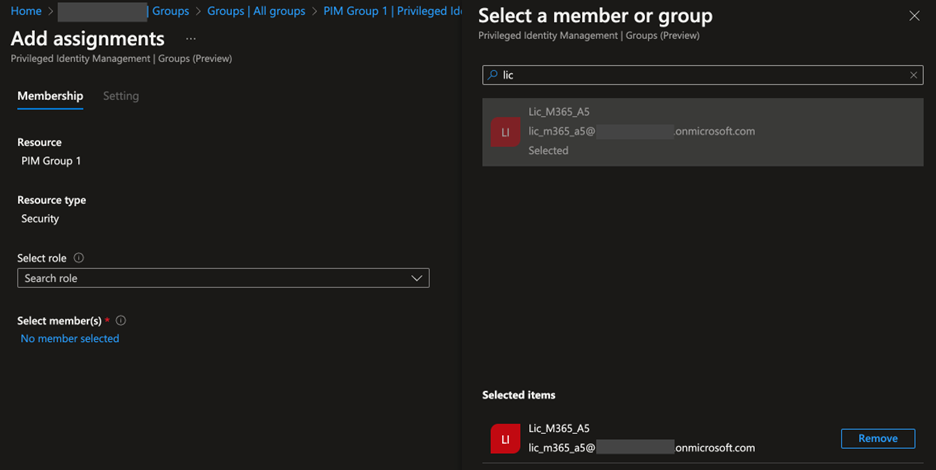
Synced Groups in RBAC Assignments

This allows you to now use synced groups in RBAC assignments.

Share:

Facebook
Twitter
LinkedIn

Get Microsoft Updates Before They Cost You Downtime

Retirement dates, licensing changes, and security updates from a Microsoft-exclusive team, sent when they matter, not on a filler schedule.

More Posts

Copilot Cowork: Credit-Based Billing

Until now, Copilot Cowork has been included with M365 Copilot Premium licenses. Now that Cowork has moved out of public preview, Cowork is introducing a ...
Read Full Article
SharePoint OTP Retirement Is Coming in July 2026

SharePoint OTP Retirement Is Coming in July 2026 — What IT Admins Need to Do Before Access Breaks

Starting July 2026, external users who access OneDrive and SharePoint files through legacy SPO OTP links will start receiving access denied — silently, with no ...
Read Full Article
Power Virtual Agents Is Gone. Here's What Replaced It and Why It Matters.

Power Virtual Agents Is Gone. Here’s What Replaced It and Why It Matters.

If someone on your team still calls it “Power Virtual Agents,” they’re working from an outdated map. Microsoft retired the product on November 15, 2023 ...
Read Full Article

Get Microsoft Updates Before They Cost You Downtime

Retirement dates, licensing changes, and security updates from a Microsoft-exclusive team, sent when they matter, not on a filler schedule.
Subscription Form email