
SharePoint On-Premises to SharePoint Online Migration
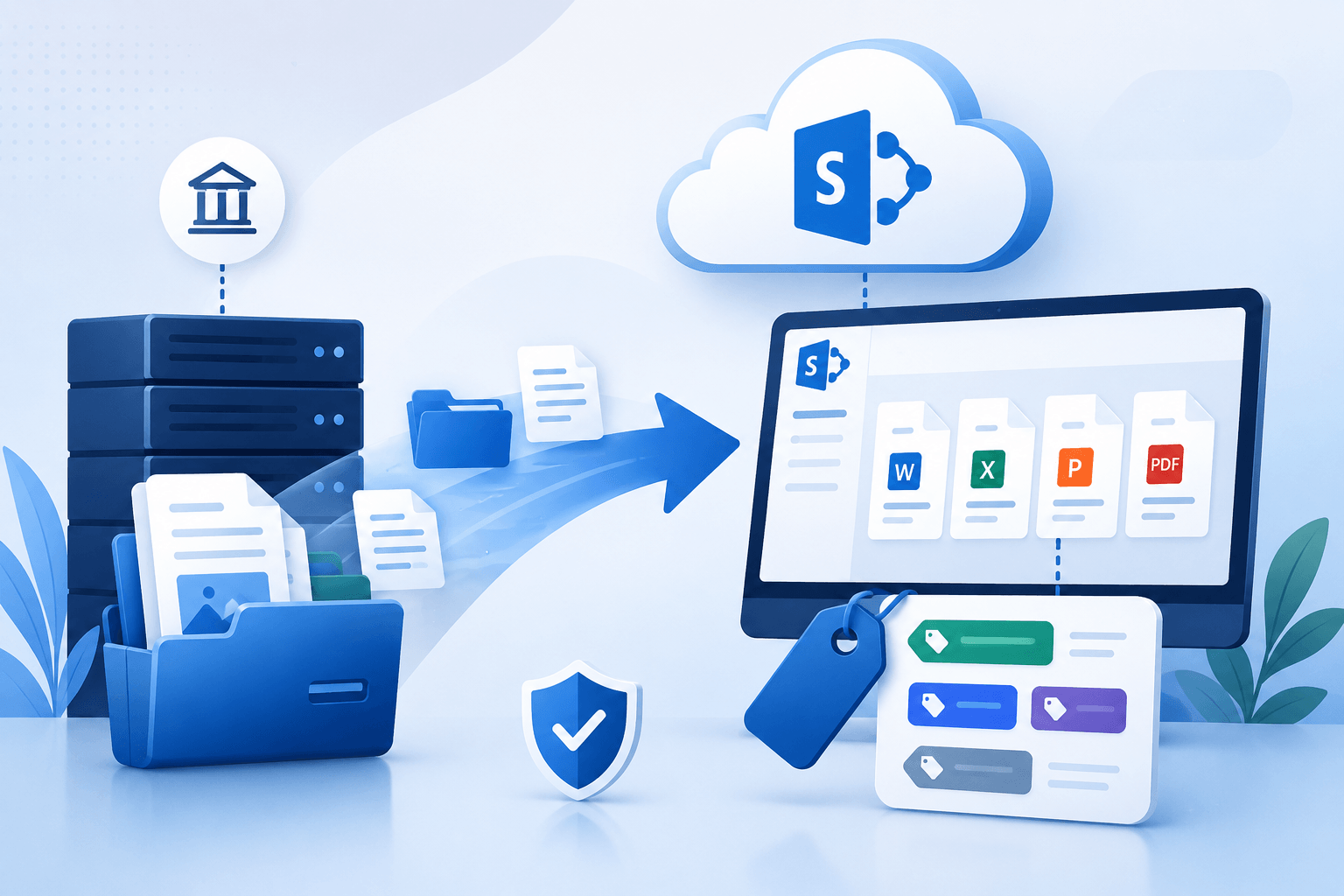
Move from SharePoint On-Premise environments like SharePoint 2010 or SharePoint 2013 into a clean, structured setup on SharePoint.com
Secure, Structured SharePoint Migration with Minimal Downtime
Windows Management Experts (WME) handles Migration to SharePoint Online with full control over SharePoint sites, permissions, and structure. Your site collection, document library, and access tied to Active Directory are planned before migration, so users land in the right place without disruption.
We align content from file shares and other sources into a single, usable environment inside Office 365.
Trusted by 500+ Global Brands and Backed by Industry Leading Tech Partners








Reasons to Move from SharePoint On-Premise to the Cloud
Organizations upgrade to SharePoint to improve Content Management, collaboration, and security. Legacy on-premises SharePoint environments, such as SharePoint 2010 and 2013, often slow workflows, complicate permissions, and require heavy maintenance.
Moving to Office 365 delivers:
Access to modern SharePoint sites and structured site collections
Real-time collaboration and integration with Microsoft Teams and Power Automate
Improved security, compliance, and security updates
Support for document library management, metadata, and version history
Alignment with current IT systems without maintaining old servers
“
WME ensures the migration is controlled and predictable, keeping SharePoint users productive from day one.
What to Watch for During SharePoint Site Migration
Migrating SharePoint is not just moving files. Risks arise when structure, permissions, and content aren’t carefully managed.
Common challenges include:
Broken SharePoint sites or misaligned site collections
User permissions and group permission mismatches
Scattered content across file shares, network drives, or Google Drive
Loss of version history or outdated list items
Complexity in large environments with large volumes of SharePoint data
Migration failures caused by inconsistent migration settings or untested migration jobs
We address these risks by planning the migration with precision, using our migration software selection, including the SharePoint Online Migration Tool, to track progress and prevent disruption.
What WME Migrates and Modernizes
WME ensures all essential SharePoint content and structures move correctly, so your environment is clean and usable from day one. This includes:
SharePoint sites and site collections, including modern and classic layouts
Document libraries, list items, and version history
SharePoint data tied to Active Directory, including First name, Last name, and email address
External content from file shares, network drives, and Google Drive
Metadata, permissions, and workflow configurations to keep SharePoint users productive
Integration readiness with Microsoft 365 tools
Every item is reviewed and mapped before migration using a mapping file or CSV file, ensuring content moves accurately and migrated files remain accessible. This prevents duplication, preserves relationships, and keeps your SharePoint environment structured.
Every item is reviewed and mapped before migration using a mapping file or CSV file, ensuring content moves accurately and migrated files remain accessible. This prevents duplication, preserves relationships, and keeps your SharePoint environment structured.
How We Execute Your SharePoint Migration
WME follows a structured process to keep your SharePoint migration predictable and controlled:
Discovery and Assessment
Planning
Execution
Validation
Stabilization
This methodology ensures each step is controlled and your move to SharePoint Online is smooth and predictable.
Technology Stack for SharePoint Migration
WME uses proven tools to make sure your SharePoint migration to SharePoint Online is precise and reliable:
SharePoint Online migration tool handles the core content transfer for SharePoint sites, document libraries, and list items.
Migration Software supports complex scenarios, large volumes, and integration with external sources like file shares, network drives, and Google Drive.
Third-party tools are used selectively for advanced mapping, custom workflows, or specialized data migration service needs.
Tools track migration jobs, progress, and status in real time to prevent migration failures.
Compatible with modern operating system environments like Windows 10, ensuring smooth execution across your IT infrastructure.
Every tool is configured to maintain SharePoint data, permissions, and site collection structure, so your teams see a clean, ready-to-use environment after migration.
Governance, Permissions, and Validation
We ensure the SharePoint migration keeps your environment secure, organized, and fully auditable. Group and user permissions are aligned with Active Directory, so every SharePoint site, in fact, the whole site collection, has the correct level of access from the start.
During migration, sensitivity labels and security updates are applied to meet corporate and regulatory requirements without gaps. Every step is tracked through a migration report, with clear visibility into migration progress and validation of all migration jobs.
We maintain content integrity by preserving version history, list items, document libraries, and associated workflows. This ensures that SharePoint users can continue working without confusion, while IT teams retain full confidence that all SharePoint data and structures are accurately migrated.
This focus on adoption and continuity helps your teams start using SharePoint.com effectively from day one.
Real-Time Access
Users can continue working without waiting for migration jobs to finish, minimizing downtime.
Collaboration Tools
Integrate tools like Microsoft Teams and Power Automate so workflows continue seamlessly.
Training and Support
Provide guidance on updated SharePoint sites, site collections, and document libraries.
Smooth Transition
Ensure users find their list items, SharePoint data, and permissions intact in the new environment.
WME keeps SharePoint users productive throughout the migration.
Keeping Teams Working Without Interruption
Technical Support
Provide ongoing technical support for any issues that arise in real systems.
Content Verification
Confirm all migrated files, list items, and document libraries are accessible and correctly structured.
Monitoring
Track migration status and progress to catch and resolve issues quickly.
Continuous Stability
Maintain alignment with Active Directory, sensitivity labels, and SharePoint data governance.
A migration doesn’t end once Exchange mailboxes are moved. At WME, we provide post-migration support to ensure your organization fully benefits from Microsoft 365 while keeping operations seamless.
Post-Migration Support and Business Continuity
Why Work with WME
WME specializes in SharePoint migration to SharePoint Online with a focus on structure, governance, and user continuity.
We bring proven migration experience handling complex environments with multiple SharePoint sites and large volumes of SharePoint data. Each migration is approached with a clear understanding of structure, dependencies, and long-term usability.
Our team follows a controlled migration process, supported by well-defined settings, structured planning through mapping files, and continuous tracking of migration jobs to maintain accuracy and visibility throughout execution.
The approach is built for IT admins, SharePoint users, and leadership teams who need predictability. Every step is aligned to reduce disruption and keep systems usable during the transition.
After migration, WME provides technical support and validation to ensure the environment remains stable, organized, and ready for ongoing collaboration.
REAL-WORLD MIGRATION RESULTS
See How We've Helped Organizations Modernize Their Microsoft Environments



Ready to Start Your SharePoint Migration?
Take control of your SharePoint Online migration and eliminate the risk of broken sites or lost content.