Until now, Copilot Cowork has been included with M365 Copilot Premium licenses. Now that Cowork has moved out of public preview, Cowork is introducing a different operating model for Microsoft 365 admins, where Cowork is now usage-based. Organizations must now pay for Cowork tasks with Copilot Credits. That makes Cowork powerful, but it also means admins should not enable it broadly without cost controls, access policies, and a rollout plan. We are already seeing feedback that some tasks people have been doing regularly with Cowork would cost hundreds of dollars in credits. Costs like that can quickly grow exponentially if not properly managed.
This post walks through a practical implementation for M365 admins. You should start by estimating your usage, setting conservative user limits, running a controlled pilot, monitoring actual usage and adjusting credit allotments, and then expanding access with confidence.
ON THIS PAGE
Licensing and Billing
First, Cowork is now not just simply "included" because a user has access to M365. Copilot Cowork still requires the M365 Copilot Premium license as a prerequisite, but now Cowork requires credits in order to function.
First, Cowork is now not just simply "included" because a user has access to M365. Copilot Cowork still requires the M365 Copilot Premium license as a prerequisite, but now Cowork requires credits in order to function.
The core billing unit is a Copilot Credit. As of this writing, a Copilot Credit is $0.01 at pay-as-go-you pricing, with discounts available if you pre-purchase credits.
The simple math is:
- 1,000 credits = $10
- 5,000 credits = $50
- 10,000 credits = $100
- 25,000 credits = $250
Use these numbers to help quantify cost with IT management and finance.
Not sure your licensing lines up with usage-based billing?
We'll confirm your Copilot Premium and Azure billing link are set up correctly before your first credit is spent.
Review My LicensingEstimate Your Own Cost
Use the sliders below to model a pilot against your own team, based on the light/medium/heavy credit ranges described in the next section.
ESTIMATED MONTHLY CREDITS
—
ESTIMATED MONTHLY COST
—
Suggested per-user monthly cap: —
Estimates use the midpoint of the illustrative ranges described below (light: 135, medium: 500, heavy: 1,500 credits per task) at $0.01/credit pay-as-you-go pricing. Your actual usage will vary — treat this as a planning starting point, not a bill.
Pilot First
Cowork is designed for delegated, multi-step work, which is very different from a user asking Copilot Chat for a quick summary. Cowork credit usage varies based on four cost buckets: models, runtime, context, and tools. In other words, a short task that drafts a weekly update does not cost the same as a task that analyzes months of product usage data and creates a leadership-ready analysis.
Microsoft provides illustrative Cowork planning ranges: light scenarios may consume 70–200 credits, medium scenarios 400–600 credits, and heavy scenarios may get to 1,500 credits.
Because usage varies by role, workflow, and behavior, the wrong move is enabling Cowork for everyone with unlimited spending. The right move is a small, measurable pilot with some guardrails in place.
Ready to pilot Cowork the right way?
We'll help you pick pilot users, set spending policies, and avoid the unlimited-spend mistake described above.
Plan Your Pilot ProgramStep-by-step implementation plan
1. Build an initial cost model
Start by identifying likely Cowork users. You should work to determine the number of users, estimating prompts across light, medium, and heavy prompts, and applying an average price per prompt to estimate monthly Copilot Credit spend.
For a first-pass model, estimate:
- Number of pilot users
- Expected light, medium, and heavy tasks per user per month
- Expected credits per task
- Monthly credit budget
- Monthly dollar budget
For example, if you pilot 25 users with a 5,000-credit monthly cap, your maximum monthly exposure is roughly 125,000 credits, or about $1,250 at pay-as-you-go rates.
2. Configure usage-based billing
In the M365 admin center, go to Copilot > Cost Management. This is where you can manage the spending for AI experiences by using usage-based billing, including allocating credits, applying policy-based access and limits, and using budgets, alerts, and hard caps.
You must first link the billing to an Azure subscription. You don't have the option to specify a resource group here, so if you need to clearly track costs, you may need a subscription just for this.
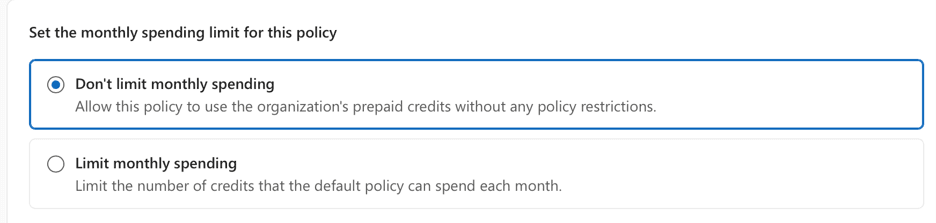
During setup, you will configure a spending policy. At this stage you should create a "All Users" policy that basically has pay-as-you-go spending set to zero. You can do this by leaving Set the monthly spending limit for this policy as Don't limit monthly spending.
AND by setting Select monthly budget limits for users (optional) to zero.
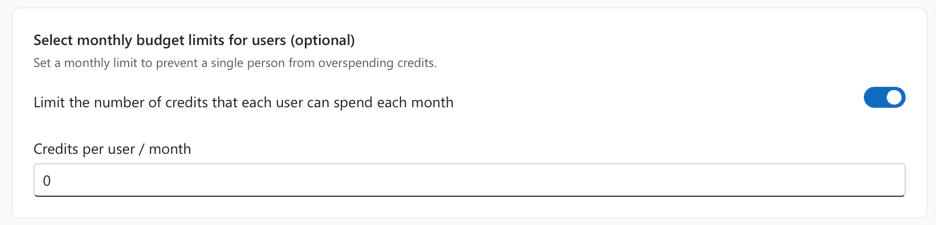
This will make sure that all users have no spending by default, which eliminates future mistakes of users ending up without a spending limit applied.
3. Create a security group for pilot users
For pilot users, create dedicated security groups, like Copilot-Credits-General-Pilot and Copilot-Credits-PowerUsers-Pilot. Populate this group with users who have real workflows to test, like IT operations, sales operations, finance analysts, program managers, or executive support teams. For larger enterprise deployments, many organizations also partner with an AI development company to identify high-value AI use cases, design secure implementation strategies, and integrate AI solutions into existing business workflows before expanding access across teams.. At this stage, you should avoid adding casual testers who are only experimenting without a business scenario.
4. Set conservative per-user limits
You should review and set monthly user limits to prevent a single person from spending all available credits. A practical starting point that should fit most piloting scenarios might be:
- General pilot users: 5,000 credits/user/month
- Power users or champions: 10,000–15,000 credits/user/month
- Workflow owners with approved use cases: 25,000 credits/user/month
Please note that these are recommendations. You should think about your own environment when building these policies and adjust as needed. The goal should be to allow enough usage to validate real scenarios while preventing uncontrolled consumption.
Create additional spending policies in the M365 admin center that match your credit spend. If users are assigned to multiple spending policies, the most-targeted (i.e. policy assigned to the least number of users) will win.
5. Configure alerts and review usage weekly
Set alert thresholds to approximately 70% and 90% of the user or policy limit. Use the cost management experience to define alerts for usage thresholds and to view consumption by users, groups, agents, and services.
During the first month, review:
- Top users consuming credits
- Top groups or scenarios driving usage
- Users that hit the limit
- If heavy usage maps to business value
Use this review to determine if limits should increase, decrease, or remain unchanged. The Consumption tab under Cost Management in the M365 admin center provides reporting by users, groups, and supported services, including Cowork.
Pre-Purchase Credits
For most organizations, pay-as-you-go is the right starting point because it requires no upfront commitment and helps establish real usage patterns. Microsoft offers the Copilot Credit Pre-Purchase Plan, or P3, as a one-year pay-upfront option where you can buy a pool of credits at tiered discounts. Note that unused credits expire at the end of the annual term.
P3 starts at 300,000 credits with a 5% discount and tiers increase up to 300 million credits with a 20% discount. You should use P3 only after you have enough data to know your baseline consumption. If your annual usage is uncertain, pay-as-you-go is safer so that you don't end up with unused credits.
Final Thoughts
Use a three-phase rollout:
- Model: estimate likely usage
- Pilot: enable Cowork for a small group with user caps
- Iterate: review usage, adjust limits, and expand to more groups
Overall, do not enable Cowork broadly without spending policies, user limits, and monitoring. Cowork can deliver meaningful productivity gains, but it also introduces variable consumption. Treat it like any other metered cloud service by governing access, monitoring usage, and scaling only after the data supports it.
Ready to Deploy Microsoft Copilot the Right Way?
Whether you're just getting started or scaling across your organization, our Microsoft 365 specialists can help you deploy Copilot securely, control costs, and maximize productivity.
Contact Our Microsoft Experts