
Copilot Is Only as Good as What It Reads
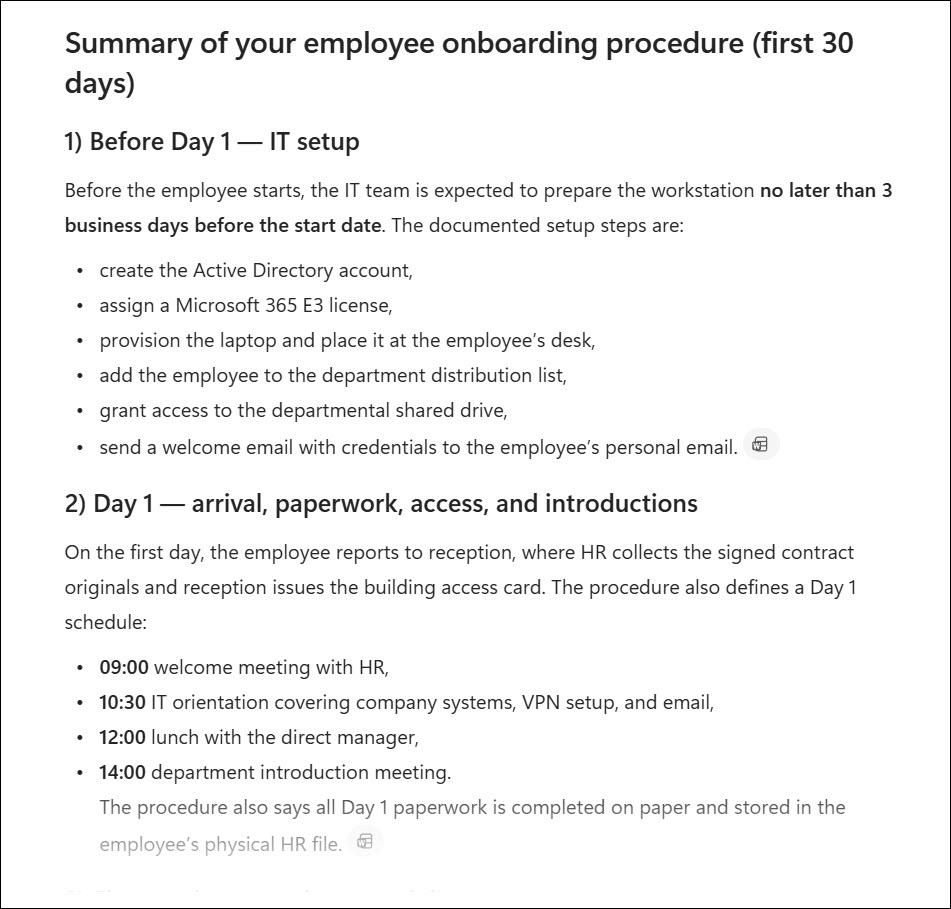
You’ve just rolled out Microsoft 365 Copilot in your organization. All licenses assigned, training done, leadership is exciting; everyone is prepared for those amazing AI features. Then someone asks Copilot to summarize the current onboarding procedure. It returns a well-formatted and detailed answer.
The only problem – Copilot used the file with the procedure that was replaced two years ago. The current version is stored in a different library that Copilot also found but didn’t use as a primary source. So, it blended multiple files into something that’s technically wrong but looks completely right.
Is this a Copilot bug? No, it’s a SharePoint problem.
I’ve seen this pattern in many organizations that deploy Copilot. People focus mainly on the technical part: training, security features, monitoring, etc… But the knowledge source is left behind.
Microsoft 365 Copilot doesn’t have its own knowledge base. It uses all of your content. Email messages, Teams messages, SharePoint files, OneDrive documents, and more. If your data is disorganized, overshared, or full of outdated documents, then Copilot will create the best answer it can from what it finds. Bad data in -> bad data out. Copilot will not help you with the quality or chaos.
What SharePoint Copilot Readiness Actually Means
Copilot readiness is a state where your organization is prepared for Copilot deployment. It’s not only technical configuration or user training. There are plenty of things to do before you actually assign licenses and start using Copilot.
On its part is SharePoint Copilot readiness – a technical and governance state of the Copilot knowledge base. It describes whether your SharePoint environment is properly configured and structured so Copilot returns outputs that are accurate, appropriate, safe, and aligned with your internal procedures. There are 4 main areas:
- The quality and structure of your content (document, pages, lists).
- The correctness of your permissions and access controls.
- The metadata implementation.
- The maturity of your SharePoint governance.
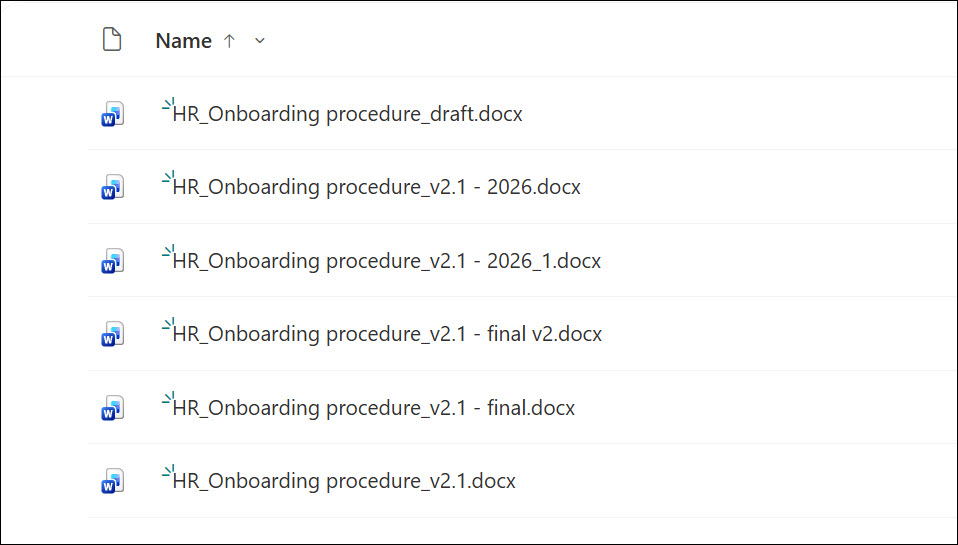
None of these are new problems and are related only to Copilot. IT admins have been dealing with SharePoint for years. Lack of metadata abandoned sites or subsites, inconsistent permissions, random file naming (Onboarding_procedure_2_2025_rev4_final_1.docx), and more. Those problems affect SharePoint search results, filtering, internal apps, and Copilot.
The difference now is that AI makes these problems more visible and harder to detect at the same time. It’s more visible because users quickly find obvious oversharing incidents and common mistakes, but in most cases, people don’t realize that the content created by Copilot is wrong or not accurate. That paradox can cause a real headache for your IT department and management.
Users will blame Copilot and will stop using it, but the problem is not the tool itself.
Why Disorganized SharePoint Breaks Copilot
Let’s take a look at the most common issues in SharePoint.
Wrong answers that look right.
SharePoint in most organizations contains multiple versions of the same documents – internal policies, procedures, document templates, offers, project summaries, etc. Copilot doesn’t pick the most recent one by default; it picks what’s accessible and contextually relevant based on your prompt. If you have three versions of your onboarding procedure document in SharePoint, then Copilot synthesizes information from all those versions! The answer will look like the proper one (because it’s based on the real documents), but it can be wrong. For example, Copilot answered with an expense limit from the old version of a travel procedure. A 1,000$ expense went through with a wrong approver. It was flagged by the finance department during the review process but required additional work and time.
Overshared data is AI-retrievable data. Oversharing in SharePoint is a serious problem that most organizations have lived with because no one noticed it before. We usually navigate to a site or a folder, check a file, and close it. We rarely use SharePoint search or spend time digging inside complex folder structures. Copilot doesn’t browse or search – it retrieves data using internal mechanisms at scale. It gets info about all your files within seconds and, based on that information, prepares an answer for you. Incorrect permissions that were practically harmless for the last 1 year have become a real exposure risk in the AI era. The Marketing budget that was shared with “Everyone” by accident last year can be easily used by Copilot. And it happens more often than you think.
Compliance risk in regulated environments. For companies in financial services, healthcare, or legal, the risk is even higher. Copilot giving the wrong content to the wrong person can create a major incident and trigger a data breach or a regulatory violation. DLP policies and sensitivity labels configured for human-centric access need to be reviewed for an AI tool such as Copilot or AI agents.
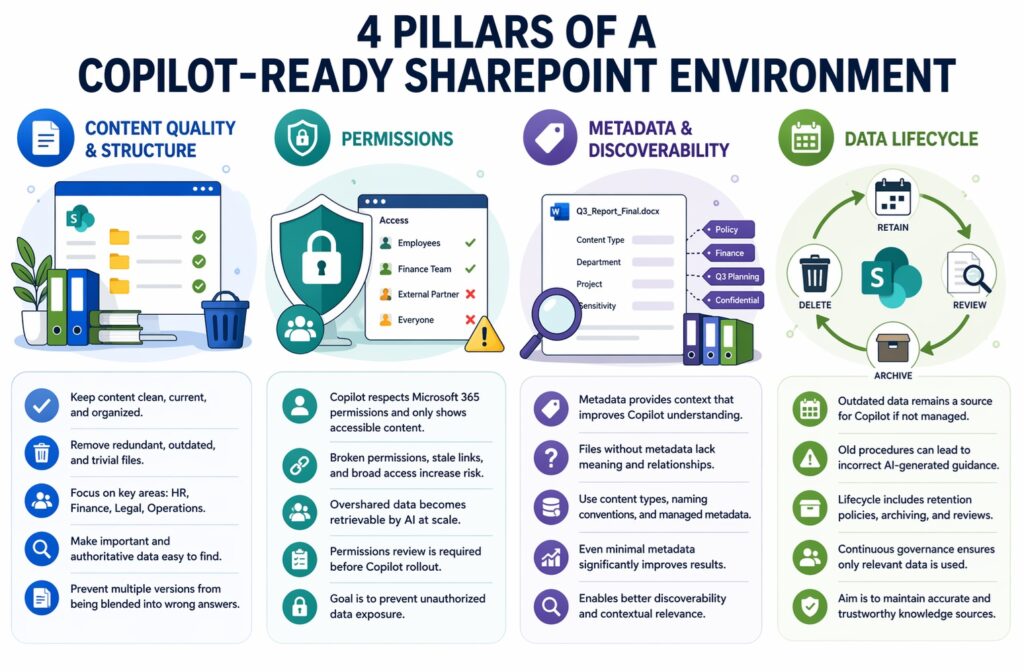
4 Pillars of a Copilot-Ready SharePoint Environment
Here are 4 pillars that will help you with a proper SharePoint readiness project.
Pillar 1: Content Quality and Structure
Copilot needs clean, current, and organized content to work with. That means you should get rid of redundant, outdated, and trivial content from your SharePoint. Make sure that the most important data is easy to identify and find.
If your SharePoint looks like a shared folder, Copilot will treat it in the same way. Of course, you don’t need to spend months rebuilding your entire information architecture. But you do need to identify the sites and libraries that matter most: HR, Finance, Legal, Operations. Think about what’s current? What’s obsolete? What’s duplicated? What’s really important? With those answers, you can configure SharePoint to give Copilot only relevant and proper data. There are embedded functions that you can use to make it work.
Pillar 2: Permissions
Copilot respects Microsoft 365 permissions, and it only shows content that the requesting user has access to. That’s a default behavior for all applications and features in Microsoft 365. For example, SharePoint search works in the same way.
The problem is that organizations have many sites with broken permissions, stale sharing links, Everyone Except External Users grants, abandoned guest accounts, forgotten sharing links, etc. These are the things that turn a minor historical issue into an AI-powered data exposure.
A permissions review isn’t optional before Copilot rollout. It’s the first thing to do, but only with a real review of those permissions and plan on how to fix them.
Pillar 3: Metadata and Discoverability
Copilot performs better when the content has context. A file named “Q3_Report_Final.docx” sitting in an unstructured document library without a content type, retention label, or any managed metadata gives very little signal to work with. Copilot will find it, but it won’t know what it is, why it was created, or how it relates to other similar files.
Consistent naming conventions, content types, managed metadata columns, and sensitivity labels greatly improve Copilot outputs. All of these require time and proper preparation but remember that you don’t need a perfect taxonomy or a naming convention. What you need is the minimum information that helps Copilot understand the context of a file. It can be 4 managed metadata properties and a consistent naming convention. You need to start and improve overtime.
Pillar 4: Data Lifecycle
Content that should have been deleted 2 years ago is still a data source for Copilot. This is one of the most underestimated factors in Copilot deployment. Imagine that Copilot reasons over old and obsolete data or give you advice based on outdated procedures.
The lifecycle of SharePoint data includes retention policies, archival processes, regular content reviews, and permission and ownership checks. When it’s implemented, Copilot accesses only current and important data. It will also give you confidence that you and your users rely on trustworthy knowledge.
How to Assess Your SharePoint Readiness Before Rolling Out Copilot
You don’t need a six-month project to get started. Here are four things you can do today to start your journey to real readiness.
Run the SharePoint Oversharing Report. It’s available directly in the SharePoint Admin Center under Reports. It shows sites with too broad or irrelevant access grants. Things like “Everyone Except External Users” or a large number of anonymous sharing links will give you a first signal of oversharing and potential problems with Copilot. If you’ve never run it, you will be surprised for sure.
Review and/or create Purview DLP policies and sensitivity labels for AI scenarios. Most DLP policies were built to prevent specific file types and data types from leaving your organization via email or Teams (e.g., sending employees’ IDs). They were not designed to protect sensitive data from AI tools like Copilot. Check your existing DLP policies and extend them for use cases related to Microsoft 365 Copilot. Use DSPM for AI in the Purview portal to get a dedicated view of your AI-related data exposure risks and potential future issues.
Audit content on your highest-traffic and most important sites. You don’t need to audit everything (it’s not even possible in large organizations). Identify the top 20 or 30 SharePoint sites with core data required by your organization. Typically, HR, IT, Finance, Legal, and Operations. For each one, ask: Is the content current? Is there a clear, authoritative version of key documents? Who owns this site, and do they know it? This process won’t take months, and the findings are critical to give Copilot a proper baseline for organizational knowledge.
Map ownership and accountability. Identify site owners for every business-critical area and explain what it means to own content in a Copilot-enabled environment. Most site owners don’t think about this; some of them don’t even know that they are owners. It needs to change before Copilot goes live. Otherwise, those gaps will resurface and create quality issues.
Usually, such an assessment will discover problems your organization didn’t know it had. That’s uncomfortable, but it’s an important step in successful Copilot adoption. If you know what’s wrong, you can fix it. If you skip or treat it as an optional step, then Copilot becomes an issue generator and a real troublemaker.
Is Your SharePoint Holding Microsoft 365 Copilot Back?
WME helps Microsoft-first organizations audit, clean, and govern their SharePoint environment — from permissions remediation to metadata structure and data lifecycle setup.
Talk to a Microsoft Expert