INFOPATH EOL BLOG SERIES — PART 3 OF 3
Part 1: Microsoft InfoPath EOL — Two Deadlines IT Teams Must Know Before July 14, 2026
Part 2: Why InfoPath Migration Is Harder Than You Think — Technical Risks, Compliance Exposure, and What to Do About It
Part 3 (this post): How to Migrate from InfoPath Before the Microsoft EOL — A Step-by-Step Guide for IT Teams
This Is the Post Where We Stop Talking About the Problem and Start Solving It
Parts 1 and 2 of this series covered the two official deadlines (May 18 and July 14, 2026), the technical reasons migration is non-trivial, and the compliance exposure for regulated industries. If you are coming straight to Part 3, those posts are worth reading first — they will save you from the most common planning mistakes.
This post is the practical half: which Microsoft tools replace InfoPath and when to use each, the full step-by-step migration framework, realistic cost and timeline ranges, a 14-point action checklist, and how WME approaches InfoPath migration engagements.
By the end of this post, your IT team will have a concrete starting point — whether you are running five InfoPath forms or five hundred
Want to skip straight to clarity? WME's free InfoPath Assessment delivers a complete inventory, risk classification, and migration roadmap
Section 1: Choosing the Right Microsoft Replacement — A Plain-English Decision Guide
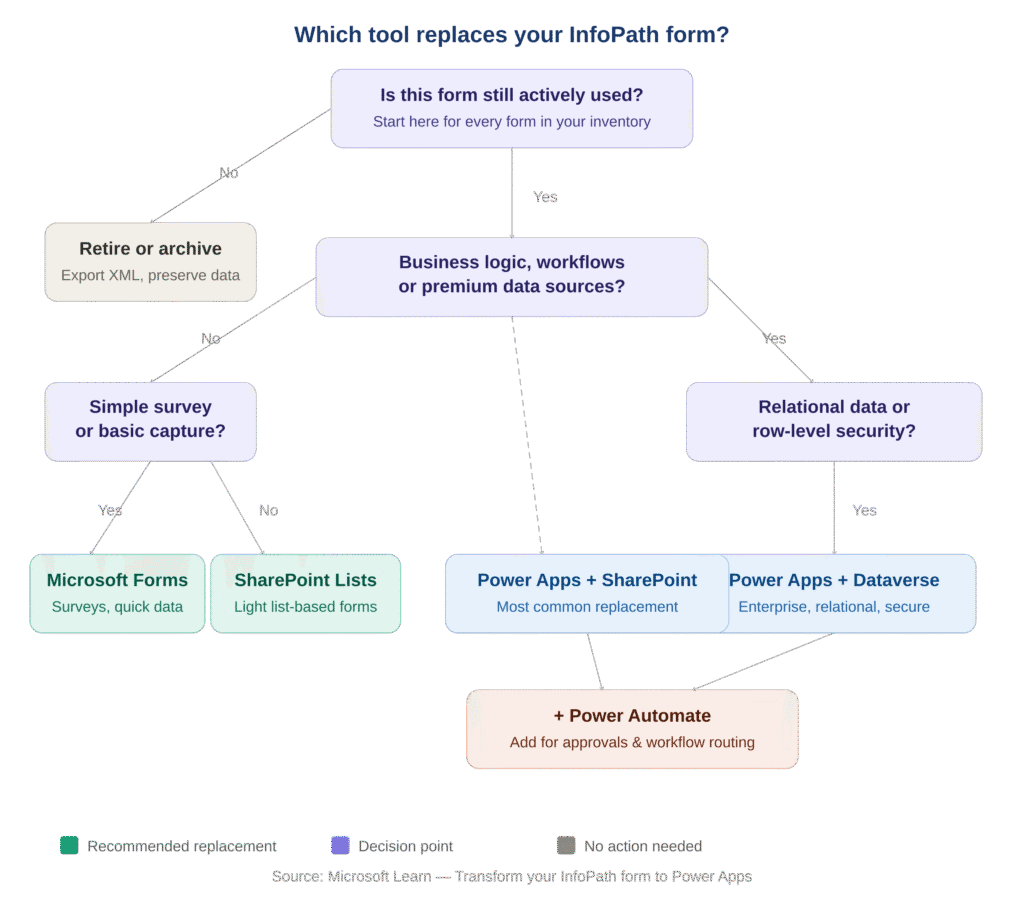
Microsoft officially recommends migrating to Power Apps, Power Automate, or Microsoft Forms, with SharePoint Framework (SPFx) Form Customizer extensions for code-heavy scenarios. But the right choice depends on your specific use case, data complexity, and licensing. Here is the complete decision framework:
The Modern Microsoft Replacement Stack
Tool | Best Replaces | Key Limitations | Licensing |
Power Apps (Canvas Apps) | Complex InfoPath forms with business logic, dynamic controls, premium data connections — the primary Microsoft-recommended replacement | Premium connectors (Salesforce, SAP, SQL Server) require paid plan. Known content type and layout limitations vs. InfoPath native behavior. | $20/user/month (Premium). Standard connectors included in M365 — premium connectors require upgrade. |
Power Automate | InfoPath approval routing, legacy SharePoint Designer workflows, backend automation and multi-step notifications | Workflow history not migrated by SPMT. Standard M365 entitlement covers standard connectors only. Per-flow plan removed for new non-CSP buyers Jan 2026. | $15/user/month (Premium) or seeded in M365 for standard flows only. |
Microsoft Forms | Simple surveys, feedback collection, basic internal data capture — scenarios where InfoPath was overkill | No complex conditional logic, no repeating sections, no custom CSS or branding, limited in GCC/DoD environments. Cannot replace InfoPath-grade workflows. | Included in Microsoft 365 — no additional cost. |
SharePoint Online Modern Lists + JSON | Simple list-based forms with basic field customization and JSON-driven layout | Cannot conditionally show/hide individual fields. No per-section CSS styling. Not suitable for complex business logic or multi-table data. | Included in Microsoft 365 — no additional cost. |
Microsoft Dataverse | Enterprise-scale applications requiring relational data modeling, referential integrity, row-level security, and high API throughput | Requires Power Apps Premium license. Significant over-engineering for flat or simple form scenarios. | Included with Power Apps Premium ($20/user/month). |
Microsoft Teams | Delivery surface — embedding Power Apps as tabs, routing Power Automate approvals via channels, surfacing Forms results | Not a form builder. Does not replace InfoPath authoring capability in any scenario. | Included in Microsoft 365. |
SPFx Form Customizer | Advanced SharePoint-native form scenarios requiring custom code, full CSS control, or complex rendering logic | Requires TypeScript/React development skills. Higher build and maintenance cost than low-code options. | No additional licensing — requires developer time. |
CRITICAL LICENSING NOTE FOR IT DECISION-MAKERS
Standard Microsoft 365 E1, E3, and E5 entitlements include Power Apps with standard connectors only. The moment a migrated form needs to connect to Salesforce, SAP, SQL Server, ServiceNow, or any premium connector, a paid Power Apps Premium plan at $20/user/month is required.
Microsoft removed the Power Apps Per App plan for new non-CSP buyers in January 2026. EA renewals and CSP customers retain access. Verify your licensing posture with your Microsoft account team before finalizing migration scope.
Failure to account for Power Apps Premium licensing is one of the most common causes of budget overruns in InfoPath migration projects.
Third-Party Tools That Help Fill the Gap
Several Microsoft MVP-backed tools reduce (but do not eliminate) manual effort for organizations with large form portfolios. All vendors explicitly acknowledge that complex business logic, managed code, and deep data connections still require manual rebuilding:
- Lightning Tools Form Migrator (Brett Lonsdale, Microsoft 365 MVP) — scans SharePoint, detects InfoPath forms, converts to Power Apps Canvas Apps or List-integrated forms.
- Skybow Studio — built-in InfoPath migration scanner producing a prioritized migration report with remediation guidance.
- Crow Canyon NITRO Studio / Fusion — extracts InfoPath data into SharePoint Lists and Library items without requiring Power Platform licensing.
- FlowForma Copilot — image-based InfoPath form replication for organizations needing rapid visual parity.
- Plumsail Forms and i3solutions — SharePoint-native alternative form designers with low-code building capabilities.
Section 2: The InfoPath Migration Framework — Step by Step
Based on Microsoft’s official guidance and the consensus methodology from Microsoft Gold Partners including Compass365, IncWorx, IW Mentor, and Skybow, here is the recommended phased migration process. The most important rule: do not skip Phase 1.
Phase 1: Discover and Inventory — Do This First
Before any migration work begins, you need a complete picture of every InfoPath form in your environment — its location, owner, dependencies, data connections, usage frequency, and linked workflows. Organizations that skip this phase consistently discover mid-project that their scope was 30 to 50% larger than estimated.
Microsoft’s recommended tool is the Microsoft 365 Assessment Tool (the open-source PnP project at github.com/pnp/pnpassessment). The InfoPath assessment module (added in version 1.5.0) produces either a CSV export (classicinfopath.csv) or a Power BI report identifying InfoPath usage per tenant, site collection, and site — including recency, volume, list and library metadata, and content type associations.
For on-premises SharePoint Server 2016 and 2019 environments, run the SharePoint Migration Assessment Tool (SMAT) to produce an infopath-detail.csv flagging forms requiring remediation. Note: SMAT itself reaches end of support on October 1, 2026 — complete your inventory before then.
Phase 2: Classify Every Form — Retire, Archive, or Rebuild
Once you have your inventory, classify each form into one of three categories. Microsoft Gold Partners including Quisitive consistently find that 20 to 40% of legacy InfoPath forms can be retired entirely after stakeholder review — a significant scope reduction before any rebuilding begins.
|
Classification |
Definition |
Action Required |
|
Retire |
Form is no longer actively used, the process has ended, or data is purely historical with no active business need. |
Archive XML data for compliance lookback. Decommission the form. No rebuild required. |
|
Archive |
Form is inactive but data must be preserved for audit, compliance, or regulatory lookback purposes. |
Export .xsn and .xml files. Generate PDF/A archives. Store in a compliant document library. |
|
Rebuild |
Form supports an active, ongoing business process and must be migrated to a supported modern platform. |
Map to Power Apps, Microsoft Forms, or SharePoint Modern Lists. Proceed with full migration workflow. |
Phase 3: Prioritize the Rebuild Queue
Not all forms carry equal risk. Prioritize your rebuild list across two dimensions: business criticality (what happens operationally and from a compliance standpoint if this form breaks on July 15?) and technical complexity (how difficult is the rebuild given the form’s logic, data connections, and workflow dependencies?).
Tackle high-criticality, lower-complexity forms first to reduce the most significant operational risks quickly and build team confidence. Reserve complex, lower-criticality forms for the later phases of your migration timeline — but ensure they are still completed before the May 18 publishing block.
Phase 4: Map InfoPath Features to Modern Power Platform Equivalents
|
InfoPath Feature |
Modern Power Platform Equivalent |
|
Conditional formatting / show-hide rules |
Power Apps visibility properties and Power Fx conditional expressions (If, Switch, IsBlank) |
|
Data connections (REST, SOAP, SharePoint lists) |
Power Apps connectors and data sources — standard (included in M365) or premium depending on the endpoint |
|
Repeating sections and repeating tables |
Power Apps galleries connected to related Dataverse tables or SharePoint child lists |
|
Calculated fields |
Power Fx formulas in Power Apps canvas apps — evaluated in real time |
|
Approval routing workflows |
Power Automate approval flows with Microsoft Teams notification and email integration |
|
People Picker controls |
Power Apps people picker control with Azure AD connector — requires identity re-mapping from Windows claims |
Phase 5: Preserve Historical XML Data — Non-Negotiable for Regulated Industries
This phase must happen before any migration tool runs against your environment. The recommended technical pattern for preserving InfoPath submission history:
- Export the .xsn template and extract the embedded XML schema (manifest.xsd) to preserve the original form definition.
- Bulk-download all .xml form submissions from the SharePoint Form Library via PowerShell (Get-PnPFile) or CSOM/WebDAV before the library is modified.
- Parse the XML programmatically and flatten repeating sections into related Dataverse tables or SharePoint child lists for structured access.
- Extract embedded attachments (5 MB cap) into a separate document storage location with proper permissions.
- Store legacy .xsn and .xml archives in a compliant, access-controlled document library. Generate PDF/A archives for long-term compliance lookback.
- Extract all workflow history before running SPMT — SPMT drops workflow history and in-progress state permanently during migration.
DO THIS BEFORE ANYTHING ELSE RUNS IN YOUR ENVIRONMENT
Once SPMT runs or SharePoint libraries are modified, workflow history is gone. There is no recovery path.
For HIPAA, SOX 404, and ISO 27001 audit requirements, the historical approval records and timestamped workflow data in your InfoPath environment are compliance evidence. Treat their preservation with the same urgency as the migration itself.
Phase 6: Choose Your Data Architecture Per Form
Every form in your rebuild queue needs a data architecture decision before development begins. The choice between SharePoint Lists and Dataverse is one of the most consequential technical decisions in the migration — getting it wrong creates rework.
Use SharePoint Lists When… | Use Dataverse When… |
The form data is flat (no one-to-many relationships) | The form has repeating sections requiring one-to-many data relationships |
Row count will stay under 100,000 items | You need referential integrity, cascading deletes, or calculated rollup fields |
Microsoft 365 standard licensing is the constraint | Row-level security, business rules, or model-driven app UI is required |
Team collaboration and document-centric workflows | API throughput needs exceed 600 calls/minute (Dataverse supports 6,000/5 min vs SharePoint’s 600/min) |
The replacement form is low-complexity and low-risk | Enterprise-scale applications with complex data models and security requirements |
Phase 7: Build, Test, Train, and Decommission
With data preserved and architecture decided, the remaining phases follow a standard IT delivery model:
- Pilot first. Build a small batch of medium-complexity forms to validate your Power Fx approach, data architecture, and connector configuration before committing the full rebuild queue.
- Build the full replacement portfolio. Work through the prioritized rebuild queue. Use citizen developers for simpler forms (low-code Power Apps canvas apps) and reserve Power Fx specialists for complex logic and Dataverse modeling.
- Run parallel testing. Operate the new Power Apps forms alongside the legacy InfoPath forms (where possible) to validate data parity, logic equivalence, and workflow output before cutover.
- Execute user adoption and training. Brief business users on the new interface, document changes from the InfoPath experience, and provide hands-on training sessions. Change management failure is one of the top reasons technically successful migrations still get rejected by end users.
- Phased rollout by department or form category. Avoid a big-bang cutover. Roll out by business unit, starting with non-critical departments to surface issues before migrating mission-critical workflows.
- Decommission and archive. Remove InfoPath form associations from SharePoint libraries, archive all .xsn and .xml data, document compliance evidence for your auditors, and update your IT asset inventory.
Section 3: Realistic Timelines and Cost Ranges
One of the most important things IT leaders need to communicate to executive stakeholders is that InfoPath migration projects have real cost and timeline ranges — and organizations that skip the assessment phase consistently underestimate both by 30 to 50%.
Migration Timeline by Portfolio Size
Portfolio Size | Estimated Active Project Time | Key Driving Factors |
Less than 10 simple forms, basic workflows | 2 to 4 weeks active project work | Low complexity, no premium connectors, minimal data extraction or workflow history requirements |
50 or more forms, 100 or more workflows | 8 to 16 weeks active project work | Dependency mapping, phased rebuild queue, parallel testing cycles, user training across business units |
Enterprise — hundreds of forms | 12 to 18 months end-to-end | Full discovery program, governance and DLP setup, phased organizational rollout, change management program |
Compass365 partner engagement range (full discovery through rollout) | 4 to 28 weeks | Varies by organizational readiness, form complexity, and data architecture decisions |
Section 4: Your 14-Point InfoPath EOL Action Checklist
Use this checklist to assess where your organization stands today. The internal deadline to target is May 1, 2026 — two weeks before the May 18 publishing block makes any remaining InfoPath forms immovable.
Action Item | Notes / Owner |
1. Run the Microsoft 365 Assessment Tool to produce a full InfoPath inventory across your tenant (classicinfopath.csv or Power BI report) | |
2. For on-premises SharePoint Server environments, run SMAT to produce infopath-detail.csv before its October 2026 end of support | |
3. Identify the business owner for every active InfoPath form — technical migration requires business context | |
4. Classify every form: Retire, Archive, or Rebuild. Target 20 to 40% retirement to reduce scope before any rebuild begins | |
5. Prioritize the Rebuild queue by business criticality and technical complexity | |
6. Extract all workflow history BEFORE running SPMT — history is permanently dropped during migration | |
7. Determine Power Apps licensing requirements — standard M365 entitlement vs. Premium plan for premium connectors | |
8. Map each high-priority InfoPath form’s features to Power Platform equivalents (rules, data connections, repeating sections) | |
9. Define data architecture per form — SharePoint Lists for flat data, Dataverse for relational or security-critical scenarios | |
10. Flag all forms tied to HIPAA, SOX 404, or ISO 27001 controls for priority treatment and compliance evidence documentation | |
11. Engage a migration partner or confirm internal Power Fx and Power Automate skill availability before committing to internal delivery | |
12. Set your internal completion target at May 1, 2026 — two weeks before the May 18 publishing block removes all fallback options | |
13. Build your user adoption, training, and change management plan alongside the technical migration work — not after it | |
14. Archive all .xsn and .xml data in a compliant document library before July 14, 2026 and document the archival as compliance evidence |
Section 5: Why Organizations Choose WME for InfoPath Migration
Windows Management Experts (WME) is an IT migration services provider specializing in Microsoft 365, SharePoint modernization, and Power Platform transformation. Our approach to InfoPath EOL migration is assessment-led and fixed-scope — we start by understanding exactly what you have before recommending a solution, so there are no surprises on timeline or budget.
What WME Brings to Your InfoPath Migration
- Proven SharePoint modernization methodology. From SharePoint Server 2016 and 2019 migrations through full Power Platform transformation — WME has delivered IT migrations across healthcare, finance, government, manufacturing, and enterprise IT environments.
- SOC 2 Type 2 certified. WME holds SOC 2 Type 2 certification, meaning your form data, historical XML archives, and workflow history are handled with independently verified security controls throughout the migration engagement.
- Compliance-aware migration. WME maps InfoPath-dependent workflows to HIPAA, SOX, and ISO 27001 control requirements, ensuring your audit trail and compliance evidence survive the transition and satisfy auditor scrutiny.
- Power Platform expertise. Power Apps, Power Automate, Dataverse, and Microsoft Teams integration — delivered by engineers with deep experience rebuilding complex InfoPath portfolios at scale.
- Fixed-scope engagements. We do not estimate without assessing. Every WME InfoPath migration begins with a formal discovery phase so your budget and timeline are defined before work starts — not discovered mid-project.
- Change management and user adoption. The technical migration is only half of the project. WME provides training, phased rollout support, and change management guidance to ensure your users are productive on day one with the new Power Apps solution.
The WME Free InfoPath Assessment — What It Covers
The free WME InfoPath Assessment is a no-commitment, one-week engagement designed to give IT leaders the clarity they need before committing to a full migration project. In the assessment, WME will:
- Run the Microsoft 365 Assessment Tool against your tenant to produce a complete, verified InfoPath form inventory.
- Classify your forms into Retire, Archive, and Rebuild categories — with specific recommendations for each.
- Flag any forms tied to HIPAA, SOX 404, ISO 27001, or other regulatory controls for priority treatment.
- Map high-priority forms to the appropriate Power Platform replacement (Power Apps, Microsoft Forms, SharePoint Modern Lists, or Dataverse).
- Deliver a prioritized migration roadmap with realistic timeline and cost estimates based on your actual environment — not a generic template.
- Review your Power Platform licensing posture and identify any gaps before migration work begins.
The assessment gives IT leaders the information they need to brief executive stakeholders, finalize the migration budget, and make a data-driven decision about internal resources versus partner engagement.
The May 18 publishing block is the real deadline. Don't get caught with immovable forms.
Book your free WME InfoPath Assessment today and start from a position of clarity — not crisis.
The Bottom Line: Migration on Your Terms or the Deadline's Terms
The Microsoft InfoPath EOL is one of the few IT migrations that comes with a hard, immovable binary cutoff. There is no graceful degradation, no extension option, and no automated tool coming to simplify the work. Every form must be rebuilt, every compliance dependency must be mapped, and every workflow history must be extracted before the deadline removes those options permanently.
The organizations that navigate this well are not the ones with the largest teams or the biggest budgets. They are the ones that started with an honest inventory, classified their portfolio with clear criteria, and executed against a realistic plan with experienced support.
The modern Microsoft Power Platform — Power Apps, Power Automate, Dataverse, and Microsoft Teams — is a genuine improvement over InfoPath in every meaningful dimension: capability, security, maintainability, and Microsoft’s long-term investment roadmap. The forms that replace your InfoPath portfolio will be better. The question is whether you build them on your timeline, or scramble to rebuild them after July 14 proves the deadline was real.
READ THE FULL SERIES
Part 1: Microsoft InfoPath EOL — Two Deadlines IT Teams Must Know Before July 14, 2026
Part 2: Why InfoPath Migration Is Harder Than You Think — Technical Risks, Compliance Exposure, and What to Do About It
Part 3: How to Migrate from InfoPath Before the Microsoft EOL — A Step-by-Step Guide for IT Teams