
INFOPATH EOL BLOG SERIES — PART 2 OF 3
Part 1: Microsoft InfoPath EOL — Two Deadlines IT Teams Must Know Before July 14, 2026
Part 2 (this post): Why InfoPath Migration Is Harder Than You Think — Technical Risks, Compliance Exposure, and What to Do About It
Part 3: How to Migrate from InfoPath Before the Microsoft EOL — A Step-by-Step Guide for IT Teams
The Misconception That's Costing IT Teams the Most Time
Part 1 of this series covered the two official deadlines — May 18, 2026 and July 14, 2026 — and confirmed that the InfoPath Forms Services retirement applies to every Microsoft 365 environment with no extension option. If you haven’t read Part 1, start there.
This post addresses the next question IT teams consistently underestimate: why is InfoPath migration actually hard, and what happens to organizations that get it wrong?
The most dangerous assumption about InfoPath EOL is that migration is a straightforward lift-and-shift: rebuild the form in Power Apps, point it at the same SharePoint list, done. In reality, InfoPath’s underlying architecture creates technical blockers that have no automated solution — and the compliance implications of a failed or incomplete migration in regulated industries are severe.
Understanding these risks is not about creating alarm. It is about making sure IT leaders have the information they need to plan realistically, budget accurately, and make the case to executive stakeholders for doing this migration properly rather than rushing it.
Already know you need help? WME offers a free InfoPath Assessment —
complete inventory, risk classification, and migration roadmap delivered in one week.
Why There Is No Automated Migration Tool — The Technical Reality
Microsoft has explicitly confirmed: there is no automated InfoPath-to-Power Apps migration tool. This is not an oversight — it is a direct consequence of fundamental architectural incompatibility between how InfoPath stores form definitions and how the modern Power Platform handles data.
Understanding why no tool exists helps IT teams make realistic project plans instead of waiting for a converter that will not arrive.
How InfoPath Stores Data — and Why It Doesn’t Map Cleanly
InfoPath stores form definitions as .xsn cabinet files — essentially ZIP archives — containing XML schemas (XSD) plus embedded business rules. Form submissions are stored as individual .xml documents inside SharePoint Form Libraries. This architecture creates five specific migration blockers that prevent any automated conversion:
Technical Blocker | Why It Prevents Automation |
Repeating sections as nested XML | InfoPath repeating sections are nested XML nodes representing one-to-many relationships. These have no direct equivalent in Dataverse tables or SharePoint list columns — the data model must be re-architected entirely, not just converted. |
XSD type mismatches | InfoPath’s XML Schema data types (xsd:date, xsd:boolean, xsd:string patterns) do not map 1:1 to Dataverse or SharePoint column types. Each field requires manual type-mapping and validation logic review. |
Unpromoted field data | Only promoted fields appear as SharePoint columns. Unpromoted data exists only inside the XML blob — completely invisible to search, views, and reporting. Extracting it requires custom scripting, not a migration tool. |
Embedded attachments | Attachments can be embedded directly inside the XML blob (with a 5 MB cap). These must be extracted separately before the form library can be safely migrated or retired. |
Identity mismatches for People Picker fields | People Picker fields in on-premises InfoPath forms use Windows claims identity, which does not match Microsoft 365 identity. Post-migration identity re-mapping is required for every form using People Picker controls. |
CRITICAL: WORKFLOW HISTORY DOES NOT MIGRATE
The SharePoint Migration Tool (SPMT) migrates SharePoint Designer 2010/2013 workflow definitions to Power Automate — but it explicitly does NOT migrate workflow history data or in-progress workflow state.
For any organization subject to HIPAA, SOX 404, or ISO 27001 audit requirements, this is a critical issue. Historical approvals, approver comments, and timestamped workflow records must be manually extracted before migration — or they are lost permanently.
This is the single most commonly overlooked aspect of InfoPath migration planning, and one of the most costly to discover after the fact.
Microsoft has stated it is evaluating “the opportunity to offer scalable migration programs” for Power Apps, but as of May 2026 nothing has shipped. Every InfoPath form in your environment must be manually rebuilt. Plan accordingly.
The Most Common InfoPath Migration Mistakes
Based on Microsoft MVP commentary, Microsoft Partner methodology guides, and real-world project post-mortems, these are the six mistakes that consistently cause InfoPath migration projects to run over budget, over time, or fail outright.
Migration Mistake | Real-World Impact |
1. Rebuilding 1:1 instead of redesigning | Teams recreate the same broken logic in Power Apps that existed in InfoPath — carrying technical debt forward instead of eliminating it. The rebuilt forms are just as fragile as the originals, and the modernization opportunity is wasted. |
2. Skipping the inventory and dependency mapping phase | Deloitte 2024 data shows 65% of legacy migration projects reveal 20 to 50 hidden dependencies not identified upfront. Without a formal inventory using the Microsoft 365 Assessment Tool or SMAT, teams consistently discover mid-project that forms have data connections, content types, or workflow dependencies that were not scoped. |
3. Focusing on the form UI and ignoring the data layer | Teams rebuild the form interface in Power Apps but leave the underlying XML data extraction, unpromoted field mapping, and historical submission records unaddressed. The form works — but the data it was built on is inaccessible or lost. |
4. Failing to extract workflow history before running SPMT | SPMT drops workflow history permanently during migration. For regulated organizations, this means losing the audit trail for every approval process that ran through an InfoPath-connected SharePoint Designer workflow. It cannot be recovered after the fact. |
5. Under-budgeting by 30 to 50% due to skipped assessment | Organizations that skip a formal discovery phase — either to save time or cost — consistently underestimate scope. A proper assessment typically reduces overall project cost by identifying forms that can be retired (20 to 40% of legacy portfolios), reducing the rebuild queue significantly. |
6. Treating migration as purely a technical project | Even a perfectly migrated form fails if users are not trained on the new solution. Change management, user adoption planning, phased rollout strategy, and training are as important as the Power Apps development work. |
The Compliance and Regulatory Risk — Mapped to Specific Frameworks
For IT leaders in healthcare, finance, government, and other regulated industries, the InfoPath EOL is not just an operational issue — it is a compliance issue. Running unsupported software in production after extended support ends creates documented control gaps that external auditors actively flag during assessments.
The key principle: most compliance frameworks require organizations to run supported, patched software in their production environments. InfoPath Forms Services after July 14, 2026 receives no security patches, no vulnerability fixes, and no vendor support. An active InfoPath installation after that date is a documented security vulnerability — regardless of whether a breach actually occurs.
Framework-by-Framework Risk Mapping
Framework | Specific Control at Risk | Exposure After July 14, 2026 |
HIPAA Security Rule | Section 164.312(b) — Audit Controls requirement | InfoPath forms tied to ePHI workflows failing without supported alternatives creates inability to demonstrate continuous controlled access logging. This is a direct compliance gap that survives security audits. |
SOX 404 ITGCs | IT General Controls — access controls and audit trails on financially material systems | Broken approval forms and permanently lost workflow history create ITGC control gaps. External auditors will flag these during SOX 404 assessments, creating potential for material weakness findings. |
ISO 27001 | A.12.6.1 — Management of technical vulnerabilities; lifecycle controls and documented governance | Running software with no security patches after extended support ends directly conflicts with technical vulnerability management requirements. This is a non-conformity that auditors will document. |
General regulatory principle | Supported software in production requirement | Any audit framework requiring supported software treats an active InfoPath installation post-July 14 as a documented security risk and compliance issue — regardless of whether a security incident occurs. |
The Cost of Getting It Wrong
The compliance risk is not theoretical. The operational risk is quantified.
ITIC 2024 research shows that over 90% of organizations estimate the cost of unplanned downtime at more than $300,000 per hour. For financial services and healthcare organizations specifically, Gartner and industry analysis puts that figure above $5 million per hour. EMA Research 2024 found that unplanned downtime now averages $14,056 per minute across all organization sizes — a 60% increase from previous benchmarks.
A broken InfoPath form during a time-sensitive compliance workflow — a SOX approval process, a HIPAA-governed patient intake, a regulated procurement decision — does not just create user frustration. It creates direct financial and legal exposure that far outweighs the cost of a properly planned migration.
Scenario | Financial / Compliance Exposure |
HR forms break — onboarding or benefits processes fail | Delayed employee onboarding, potential labor compliance exposure, manual workaround costs |
SOX approval workflow breaks for a financially material purchase | ITGC control gap, potential material weakness finding in external audit, emergency rebuild under audit pressure |
HIPAA-governed clinical form stops submitting | Potential HIPAA audit finding, breach notification risk if ePHI is inaccessible or unlogged, regulatory penalty exposure |
Procurement approval form breaks during a high-value contract cycle | Delayed contract execution, business continuity disruption, potential emergency consultant fees for rushed rebuild |
Compliance audit documentation form fails | Inability to produce required audit evidence, potential ISO 27001 non-conformity finding, failed certification renewal |
THE DEADLINE PREMIUM — WHY WAITING COSTS MORE
Gartner data shows 83% of data migration projects fail or exceed their budget and schedule. The organizations that beat that statistic are the ones that started with a formal assessment and engaged experienced partners early.
As the July 14, 2026 deadline approaches, the consultant supply chain for InfoPath migration expertise is actively tightening. Organizations beginning migration work in Q2 2026 face premium consultant pricing and reduced partner availability.
The Standish Group 2025 report found that 67% of large-scale system replacement projects exceed budget by more than 50%, and 28% are cancelled entirely. Early assessment is the single highest-leverage action available to IT leaders right now.
What Internal Teams Can Handle — and What Should Be Outsourced
One of the most practical questions IT leaders face is where to draw the line between internal effort and external expertise. The answer is consistent across Microsoft Gold Partner guidance and MVP commentary:
Keep Internal — Irreplaceable Context | Outsource — Specialized Skills |
Business rule and process knowledge — only your team knows what the form is actually supposed to do | Power Fx development for complex Canvas App logic |
Identification of form owners across business units | Dataverse data modeling for relational and enterprise-scale scenarios |
User acceptance testing (UAT) — your users validate the rebuild | Power Automate flow design for approval routing and workflow automation |
Change management and training facilitation | XML data extraction and historical submission scripting (PowerShell PnP/CSOM) |
Go/no-go decisions on retirement vs rebuild classification | SPFx Form Customizer development for advanced SharePoint-native scenarios |
Stakeholder communication and executive reporting | Governance, DLP policy setup, and Microsoft 365 compliance configuration |
The practical implication: most organizations need a hybrid approach. Internal business knowledge is irreplaceable, but the technical execution — Power Fx development, Dataverse modeling, XML extraction, governance setup — requires specialized skills that take months to build internally and are available immediately from an experienced partner.
What Comes Next
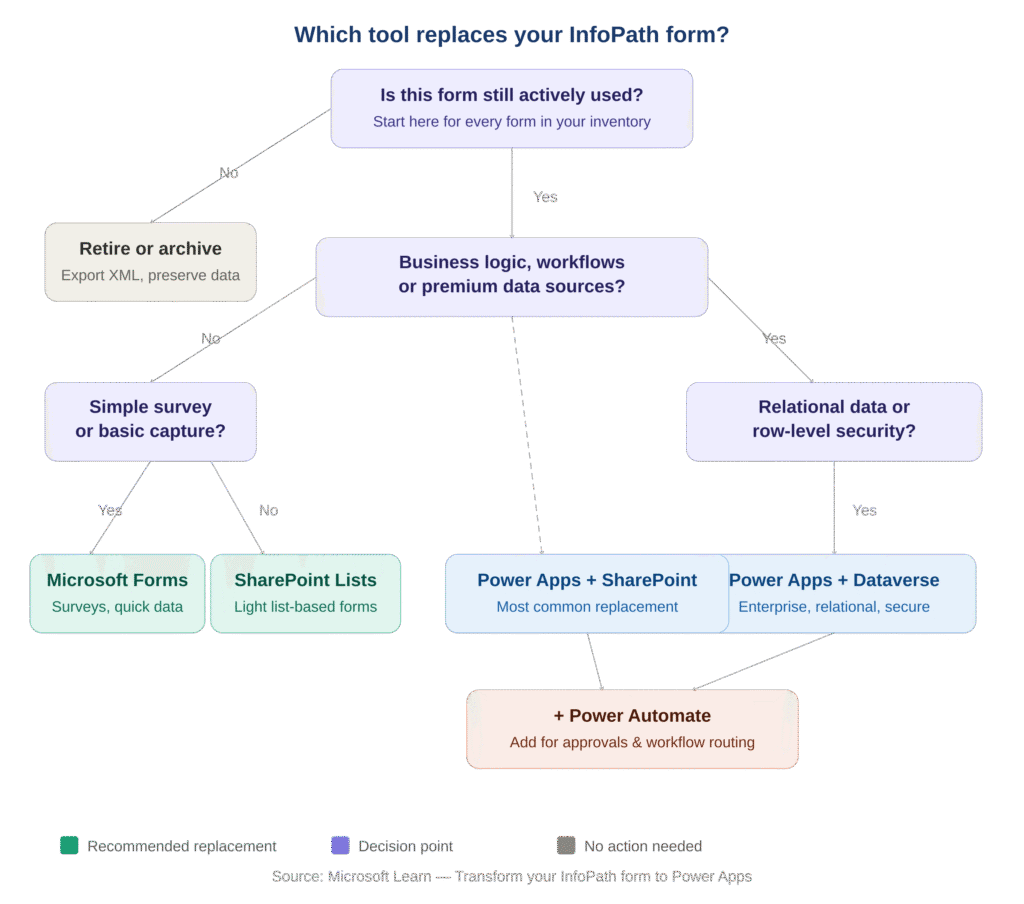
Now that you understand why InfoPath migration is technically complex and what the compliance stakes are, Part 3 of this series covers the practical path forward: the Microsoft replacement tool decision guide, the full step-by-step migration framework, realistic cost and timeline ranges, and a 14-point action checklist for IT teams.
READ THE FULL SERIES
Part 1 (this post): Microsoft InfoPath EOL — Two Deadlines IT Teams Must Know Before July 14, 2026
Part 2: Why InfoPath Migration Is Harder Than You Think — Technical Risks, Compliance Exposure, and What to Do About It
Part 3: How to Migrate from InfoPath Before the Microsoft EOL — A Step-by-Step Guide for IT Teams
All three posts available at winmgmtexperts.com/blog