Microsoft hosted Microsoft ignite event in the mid of October. Now Microsoft ignite is welcoming to all kind of roles such as IT decision makers and IT implementers to developers and data and security professionals. Windows 365 is a software-as-a-service (SaaS) solution. SaaS is a software distribution model where services are hosted by a cloud service provider. Here, it provides cloud security, allowing employees to stream their personalized Windows desktop from the Microsoft Cloud to any device. Organizations around the world and across every industry are seeing the benefits of migrating and modernizing their workloads to the cloud. And Windows 365 is expanding too.
Windows 365 enables new scenarios
In this Microsoft ignite, they have announced Windows 365 app public preview, Windows 365 Government general availability, Citrix HDX Plus for Windows 365 public preview, and cloud-optimized IT management. Also soon shift and part-time employees can access windows 365.Employees who needs Cloud PC for their work can be able to use windows 365.
Windows 365 app public preview
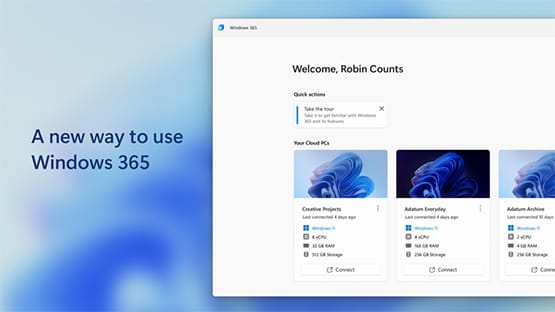
We can access Windows 365 Cloud PC by using Windows 365 app and we can access it from the taskbar or the Start menu. The Windows 365 app is now in public preview in the Microsoft Store on Windows.
Windows 365 Government general availability
Windows 365 Government is now available for US Government Community Cloud Environments Government Community Cloud (GCC) and Government Community Cloud High (GCC High). Windows 365 Government Built to meet the enhanced security of the cloud and compliance requirements of the US government. It empowers flexibility and innovation. Windows 365 Government enables US Government contractors and the local, state, and federal customers they support to securely stream their Windows apps, data, content, and settings from the Microsoft cloud to any device, any time.
Citrix HDX Plus for Windows 365 public preview
Citrix HDX Plus for Windows 365 is also in public preview and will be generally available later this calendar year. It is available for the customers who are working in Microsoft Intune console. endpoint admins need to perform few steps to enable environments and assign licenses, after this Citrix components will be automatically installed to cloud PCs. Once installation process is completed licensed employees can be use their Cloud PC from the same Citrix environment they use today.
Windows 365 is built for Zero Trust security
Security is the most important factor to all the organizations around the world.so Microsoft is making additional investments for windows 365 it is focusing the security of both organizational data and user access. To better audit and manage the data in your environment, we will make a new device action generally available later this month for eDiscovery that allows IT to capture the latest snapshot of an employee’s Cloud PC with options to remove access when doing a forensic investigation. Microsoft is also investing in capabilities, it allows organizations to encrypt cloud PCs with customer managed keys to meet security and compliance requirements. Microsoft is providing seamless user experience.
Microsoft will be releasing single sign-on features in the part of Windows 365.In this feature employees will only see a single credential prompt to prove their identity:
- Employees using a managed Windows device will receive the familiar password-less experience of logging into their local Windows device, using Windows Hello for Business or a FIDO2 security key.
- Employees using an unmanaged device—like a personal PC—will receive the same single sign-on experience once they authenticate to Azure Active Directory (Azure AD) where they can provide a password-less credential.
Single sign-on experience carries into the Cloud PC, so the employee can be productive on any Microsoft 365 or Azure AD-registered app.
New cloud-optimized IT management capabilities
Cloud-optimized IT management capabilities is to empower IT admins. It has set of capabilities to provide best employee experience.
Cloud PC connection quality – Cloud PC performance page allows IT admins to get visibility into roundtrip time, time to connect, and available bandwidth. It allows admins to take actions to optimize network configurations to reduce latency.
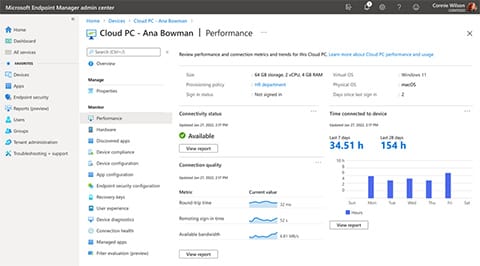
Cloud PC utilization on the Cloud PC performance page – It is an optimization tool that enables admins to identify devices with low utilization and take actions to either deprovision, reallocate to new users, or downsize Cloud PCs.
Real-time connectivity health checks and troubleshooting – It can be initiated by both the IT admin and the employee.
Point-in-time restore is the built-in business continuity and disaster recovery solution (BCDR) – It allows employees or admins to recover Cloud PCs in case of critical disasters such a zone outage or device damage with an automated, simple, out-of-the box tool.
Resize – Resize functionality now allows endpoint admins to downsize Cloud PCs, in addition to upgrading them.
Alerting – It allows IT admins to receive alerts for critical factors that impact devices such as failed network connections, provisioning policies, or image uploads.
Resource performance on Endpoint Analytics – It helps admins identify devices that are under-resourced on compute (vCPU and memory) to take an action to resize.
Windows 365 sessions at Microsoft Ignite
-
- Microsoft Ignite Opening
- Re-energize your workforce in the office, at home, and everywhere in between
- Windows: Building what matters most for your business
- Secure your workforce with Windows + Intune
- Ask the Experts: Windows 11, Windows 365, and Microsoft Intune
- Experience Windows in the cloud with Azure Virtual Desktop and Windows 365